
Riverside is the strongest general starting point for remote video interviews, while Cleanfeed is the clearest audio-first option and StreamYard fits teams that record and broadcast live. The right choice still depends on how guests join, how files survive weak Wi-Fi, and what your editor receives afterward.
For a client-facing podcast, recording software has one job: protect the conversation. Effects and AI clips come later. Local capture, isolated tracks, progressive upload, a usable backup, and low guest friction matter more.
Editorial disclosure: this is a primary-source desk review, not a claim that PGS tested every platform hands-on. Inclusion is not endorsement. No vendor paid for placement. Features and limits can change, so confirm them before buying.
The quick answer
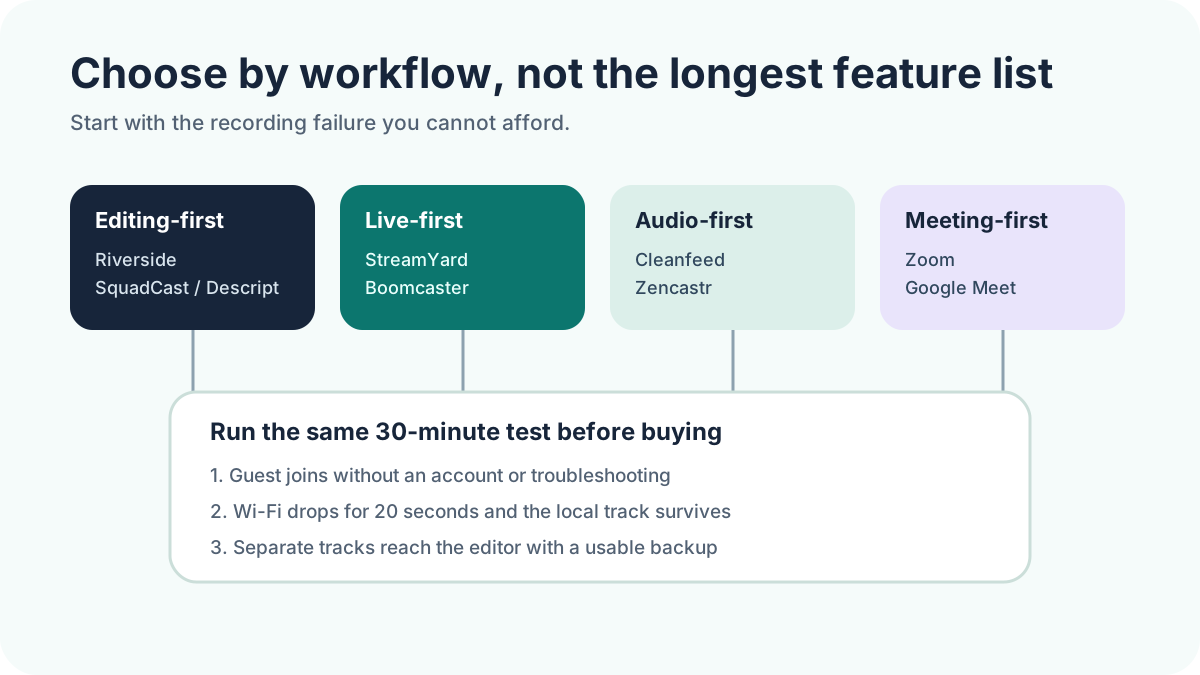
Choose Riverside or SquadCast when clean local video tracks and an editor-friendly handoff are central. Choose Descript Rooms when recording and transcript-based editing should stay together. Choose StreamYard or Boomcaster when live production matters. Choose Cleanfeed for audio-led interviews. Keep Zoom or Google Meet when guest familiarity and company controls outweigh production flexibility.
How we compared the tools
We shortlisted tools that can support a real remote interview workflow in 2026. We checked current vendor documentation for local or cloud capture, separate tracks, guest joining, backups, video and audio output, mobile access, transcription, editing, and live production. We did not rank pricing because plan limits change quickly and monthly footage varies by show.
A local recording is captured on each participant's device while the call happens. That protects the final file from many network glitches. Separate tracks let an editor repair one speaker without changing everyone else. Progressive upload reduces the risk of waiting for one huge upload after the guest leaves.
Remote podcast recording software comparison
| Tool | Best fit | Capture and handoff | Main caution |
|---|---|---|---|
| Riverside | Remote video interviews | Local, separate audio/video tracks | Confirm plan limits |
| SquadCast | Descript-centered teams | Local isolated tracks | Check current Descript workflow |
| Zencastr | All-in-one podcast workflow | Local separate tracks | Test AI workflow separately |
| Descript Rooms | Transcript-based editing | Remote recording into Descript | Editor fit matters |
| StreamYard | Recording plus livestreaming | Optional local participant tracks | Enable local recording first |
| Zoom | Familiar corporate guests | Separate computer audio files | Video is meeting-layout based |
| Podcastle | Simple creator workflow | Browser recording and editing | Verify track and plan limits |
| Boomcaster | Reliability and live production | Local isolated tracks, backup | Smaller ecosystem |
| Cleanfeed | Audio-only interviews | Browser-based audio recording | Not a video-first suite |
| Google Meet | Workspace organizations | Cloud recording and transcript | Not an isolated local recorder |
10 tools worth testing
1 Riverside
Riverside documents local recording, separate participant tracks, progressive uploading, up to 4K video, and 48 kHz audio. Its editor and repurposing tools make it the broadest starting point for B2B video podcasts. Review Riverside's podcast recording details.
Best fit: teams that want strong source files and built-in post-production. Test: guest device compatibility, upload recovery, and whether your required quality sits inside the selected plan.
2 SquadCast
SquadCast built its reputation around locally recorded isolated tracks and now sits in the Descript ecosystem. That makes it relevant when your editor already works from a transcript. Check SquadCast's current workflow.
Best fit: production teams using Descript. Test: the exact path from session creation to synced edit, including guest recovery.
3 Zencastr
Zencastr says it records each participant locally on a separate track, supports browser or iOS guest recording, and offers up to 4K video and 48 kHz audio. Guests can join by link without an account. See Zencastr recording features.
Best fit: podcasters wanting recording, production, clips, and publishing under one roof. Test: whether the combined workflow saves time without reducing editorial control.
4 Descript Rooms
Descript Rooms is a browser-based recording space connected to Descript's text-based editor. Current documentation lists recording up to 4K when the camera supports it. See Descript Rooms.
Best fit: teams that want recording, transcript editing, multicam decisions, captions, and clips in one project. Test: guest joining and the editor's actual correction workload.
5 StreamYard
StreamYard can create separate locally recorded audio and video files for each participant, plus separate screen-share assets. The setting must be enabled before recording. Read StreamYard's local recording guide.
Best fit: shows that record and livestream from the same studio. Test: clean-feed downloads, upload completion, and recovery after a guest exits early.
6 Zoom
Zoom
Zoom computer recording can save a separate audio file for each participant. The recorded video follows the meeting layout seen by the recorder, so it offers less post-production control than isolated local video platforms. See Zoom computer recording options.
Best fit: corporate guests who already know Zoom. Test: video layout, audio settings, and local disk workflow.
7 Podcastle
Podcastle combines browser recording with transcript-led editing and creator tools. Its appeal is convenience, especially for smaller shows that do not want a separate recorder and editor. Check Podcastle's current recording plans.
Best fit: solo operators seeking a simple end-to-end workspace. Test: isolated-track export, guest limits, backup behavior, and source quality on your plan.
8 Boomcaster
Boomcaster describes local double-ender recording, isolated WAV and video files, progressive uploads, cloud backups, producer controls, and live streaming. Review Boomcaster's recording layer.
Best fit: agencies and producers prioritizing redundancy. Test: guest compatibility, recovery workflow, and integration with your editor.
9 Cleanfeed
Cleanfeed is an audio-focused browser studio used for interviews and professional remote audio. It avoids the weight of a video-production suite when audio is the final product. Review Cleanfeed's current feature set.
Best fit: audio-only podcasts and interview recordings. Test: multitrack access, guest browser support, and the difference between free and paid recording controls.
10 Google Meet
Google Meet supports recording and automated transcripts on eligible Workspace editions. Transcripts are saved into the organizer's Drive and attached to the Calendar event. It is useful for governed business workflows, but it is not a substitute for isolated local participant video. See Google Meet transcript availability.
Best fit: Workspace organizations where access, consent, and Drive sharing matter most. Test: recording eligibility, consent controls, layout, and export quality.
Run this 30-minute test before paying
- Invite someone who is not technical. Do not coach them beyond the invitation.
- Record 10 minutes with a screen share and intentional overlap.
- Throttle or interrupt one connection for 20 seconds.
- Have the guest close the tab before the upload appears complete.
- Download every source and backup file.
- Ask the editor how long synchronization, transcript cleanup, audio repair, and reframing take.
The winner is not the tool with the most generated assets. It is the one that produces recoverable source files with the least guest and editor friction.
Which one should you choose?
For most remote B2B video podcasts: begin with Riverside, SquadCast, or Descript Rooms. For live shows: begin with StreamYard or Boomcaster. For audio-only interviews: begin with Cleanfeed or Zencastr. For corporate familiarity: keep Zoom or Google Meet on the shortlist, but understand the production tradeoffs.
Do not migrate because a tool added another AI feature. Migrate when the same test shows a measurable improvement in guest success, source-file reliability, or editor time.
Recording is only the input
A clean interview still needs editorial selection, clips, carousels, quotes, captions, show notes, and distribution. Read our Opus Clip alternatives comparison, use the 3-Test Rule for choosing clips, or see how the PGS Content Engine turns one approved episode into a buyer-facing content system.