
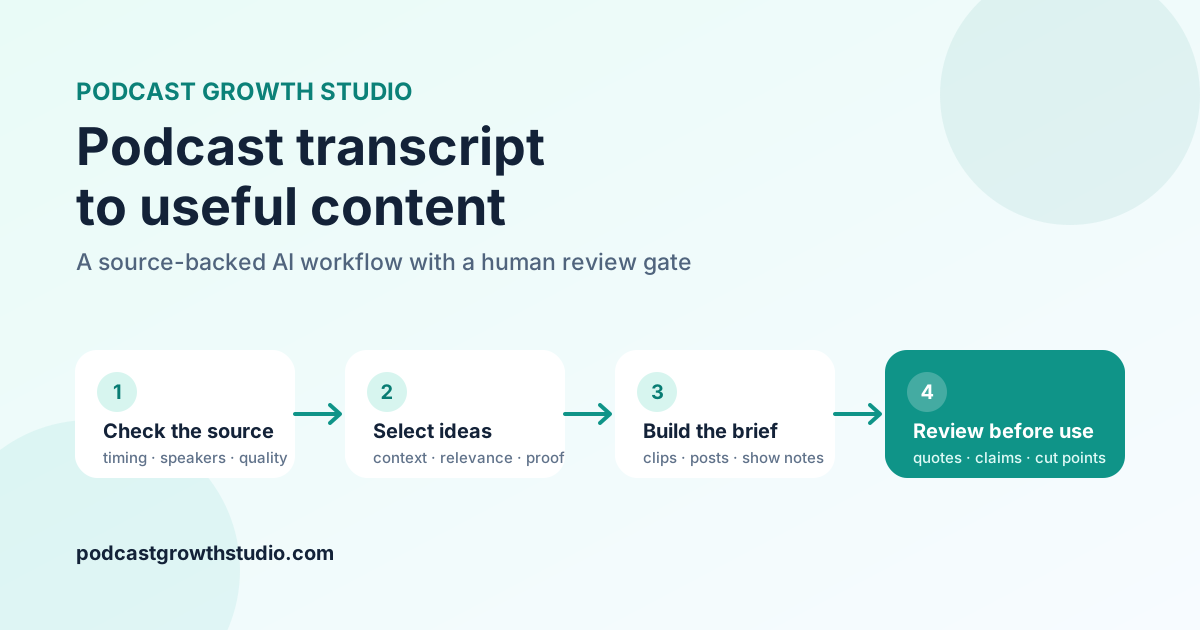
The quick answer: use AI to inspect the transcript, select complete ideas, and draft production briefs. Then verify every quote, speaker, timestamp, claim, and proposed cut against the source before production. If the transcript has no timestamps or speaker labels, the output should say so instead of guessing.
A podcast transcript can become clips, LinkedIn posts, carousels, show notes, titles, emails, and an article. The hard part is not generating more text. It is keeping the new assets faithful to the conversation while making them useful outside the episode.
Start with 5 inputs, not only the transcript
A transcript explains what was said. It does not automatically explain what the new content should accomplish. Give the AI these inputs before asking for deliverables:
- The source: the complete transcript or a clearly labelled excerpt.
- The audience: the people who should find the ideas useful.
- The business purpose: education, positioning, demand, sales enablement, or another defined job.
- The channels: LinkedIn, YouTube Shorts, email, a blog, or a focused combination.
- The production scope: how many assets the team can realistically review and produce.
Without those constraints, a model often fills a generic quota. You may receive 10 clips because you asked for 10, even when only 3 sections work without missing context. The better instruction is to treat counts as maximums and return fewer assets when the source does not support them.
Use a 4-stage transcript-to-content workflow
1. Check the source
Record whether the transcript covers the full episode, includes timestamps, identifies speakers, and has been compared with the audio. Flag suspicious names, numbers, products, and garbled phrases before using them in hooks or captions.
2. Select complete ideas
Look for explanations, arguments, stories, frameworks, mistakes, and decisions that make sense outside the original conversation. A moment that starts with “that is exactly why” probably needs the previous question. Start earlier, find a clearer restatement, or reject it.
3. Build production briefs
Give each proposed asset a source range, opening and closing anchors, intended audience value, and any accuracy warning. Separate the broad source range from the proposed edited cut. A transcript can suggest a cut, but the audio determines pauses, interruptions, delivery, and the clean final frame.
4. Review before use
Compare direct quotes and anchors with the source. Recalculate durations. Check that every calendar item points to a real asset. Mark what remains uncertain. A transcript match proves that the text appears in the file; it does not prove that the transcript heard the audio correctly or that the speaker's claim is true.
Copy this podcast repurposing prompt
Replace the bracketed fields, attach or paste the transcript, and adjust the requested formats to match your actual capacity.
You are creating a source-backed content production brief from a podcast transcript.

Audience: [specific audience]
Primary goal: [what the content should help the audience understand or do]
Channels: [LinkedIn, YouTube Shorts, email, blog]
Maximum deliverables: [example: up to 4 clips and 3 LinkedIn posts]

First assess the source:
- Is this a full transcript or an excerpt?
- Are timestamps available?
- Are speakers labelled in the source?
- Which names, numbers, claims, or phrases need verification?

Then select only ideas that make sense without missing context and are relevant to the stated audience.

For each clip candidate provide:
- working hook
- source timestamp range, or “Not available”
- speaker plus evidence status: source-labelled, context-inferred, or unknown
- verbatim opening and closing transcript anchors
- broader source range and recommended edit range
- why the moment is useful to this audience
- transcript or accuracy warnings

For every direct quote, preserve the supplied wording. Label paraphrases separately. Never invent timestamps, speaker names, statistics, links, or client results.

Return fewer assets when the transcript does not support the requested maximum. End with the checks completed and the items that still require audio or factual review.
Worked example: weak output versus reviewable output
Imagine an untimestamped excerpt says:
Most teams do not have a lead problem. They have a handoff problem. Marketing creates interest, sales replies 3 days later, and the buyer has already moved on.
| Field | Weak AI output | Reviewable output |
|---|---|---|
| Timestamp | 18:42 to 19:15 | Not available |
| Speaker | Guest | Unknown, unless the source identifies the speaker |
| Hook | Your sales team is destroying every lead | Most teams do not have a lead problem |
| Quote | “Your handoff is killing your pipeline.” | Use the supplied sentence verbatim, or label the new line as a paraphrase |
| Claim status | Presented as proven advice | A claim made in the episode; independently unverified |
The stronger version may look less dramatic. It is more useful because an editor can locate the source, understand the uncertainty, and avoid publishing invented detail.
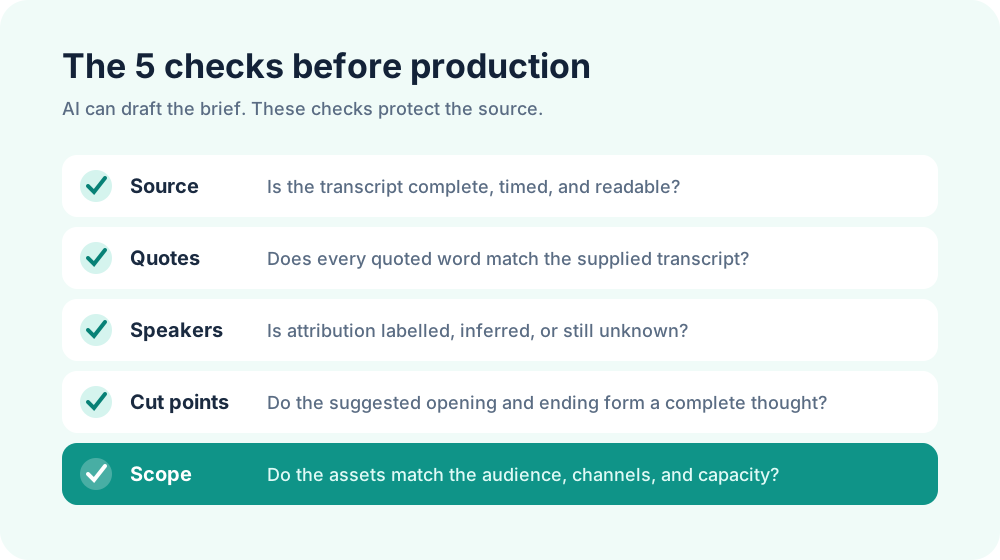
Use this human review checklist
- Source coverage: Does the plan describe only the material actually reviewed?
- Quote accuracy: Does every direct quote match the supplied transcript exactly?
- Speaker evidence: Is the name present in the source, inferred from context, or unknown?
- Timestamp integrity: Did the source provide every timestamp shown?
- Cut continuity: Are distant passages clearly labelled as an edit suggestion instead of one continuous quote?
- Transcript quality: Have names, numbers, and garbled phrases been flagged for audio review?
- Claim boundaries: Does the plan distinguish what a speaker said from what has been independently verified?
- Scope fit: Do the deliverables match the audience, channels, and production capacity?
Run this review before captions, carousels, or articles enter final production. Correcting one bad source assumption early is cheaper than repairing 5 finished assets built from it.
Build the calendar from approved assets
Create stable IDs such as C1 for a clip, P1 for a written post, and S1 for a carousel. The calendar should reuse those IDs instead of inventing new assets during scheduling. Space similar ideas apart and include non-posting days when the team needs them.
A 30-day calendar does not require 30 original posts. It can contain production, approval, publishing, and review checkpoints. The right volume is the amount the team can maintain without weakening selection or source review.
If you need help deciding which moments deserve production, use the 3-Test Rule for choosing podcast clips. For the complete system around research, recording, repurposing, distribution, and measurement, read the B2B Podcast Growth System.
Frequently asked questions
Can AI repurpose a podcast transcript?
Yes. It can identify candidates and draft useful production material. The final brief still needs source checks for quotes, attribution, timing, claims, and edit boundaries.
Can AI find podcast clip timestamps?
Only when the transcript includes reliable timestamps. If timing is missing, use searchable opening and closing anchors and mark the timestamp as unavailable.
Should podcast quotes be rewritten for clarity?
Direct quotes should match the source. If spoken language needs cleanup, label the result as a paraphrase or caption edit and check it against the audio before publication.
How many pieces of content should one episode produce?
Let the episode quality and your capacity determine the count. A focused episode may support several strong assets. A scattered or short recording may support only a few. Do not pad the plan to hit a quota.
Make the transcript useful without losing the source
AI is most valuable here when it reduces searching and organizes editorial decisions. Keep the transcript close, make uncertainty visible, and require every recommendation to point back to the source.
If you want the production handled after the plan is approved, the PGS podcast content repurposing service turns one episode into a defined, human-reviewed content batch.