
You spend two hours preparing for an episode, an hour recording it, and another hour cleaning up the audio. Four hours of work for one conversation. Then you post the episode link to LinkedIn once, watch it collect 14 likes, and move on to preparing the next one.
That episode could have produced a month of content. Instead it produced one post.
Podcast content repurposing is the discipline of closing that gap. Done properly, one recording becomes 30 or more standalone pieces of content, formatted for the platforms where your audience actually spends time, and scheduled across a full month. Done badly, which is how most people do it, it becomes a folder of random clips that nobody sees.
This guide is the complete version. What repurposing actually is, what one episode can realistically become, the workflow that produces it reliably, how to adapt that work for each platform, the tools worth paying for, and the specific mistakes that quietly waste the effort. No theory you cannot act on.
What this guide covers
- What podcast content repurposing actually is
- Why repurposing beats recording more episodes
- What one episode can become: the asset types
- The repurposing workflow, step by step
- Platform-by-platform repurposing
- The repurposing mistakes that waste the work
- Tools for podcast repurposing
- When to do it yourself vs hand it off
- Frequently asked questions
What podcast content repurposing actually is
Podcast content repurposing is the process of turning one podcast episode into multiple smaller, standalone pieces of content, each formatted for a specific platform like LinkedIn, YouTube, Instagram, or search.
The word that matters in that definition is standalone. A repurposed asset is not a teaser that points back to the episode. It is a complete piece of content in its own right. A 60-second clip that makes one clear point. A carousel that teaches one framework. A written post that delivers one insight cleanly. The person consuming it should get full value without ever knowing it came from a podcast, and without being asked to go listen to anything.
This is the line between repurposing and promotion, and it is worth being strict about. Promotion says "listen to my new episode." Repurposing says "here is one useful idea," and the episode is simply where that idea came from. Promotion asks your audience for something: their time, a click, a download. Repurposing gives them something first. One of those builds an audience. The other slowly wears one out.
Repurposing is not the same as clipping
Clipping is one tactic inside repurposing. It is the act of cutting short video segments out of a recording. Useful, but narrow. Repurposing is the whole practice, and video clips are only one of the formats it produces. A repurposing strategy that begins and ends with clips is leaving most of the episode on the floor, because a 45-minute conversation contains far more than three good video moments. It contains arguments, frameworks, stories, numbers, and turns of phrase, and most of those travel better as text or design than as video.
Why repurposing beats recording more episodes
When a podcast is not growing, the instinct nearly every host follows is to record more. Better guests. Tighter episodes. A more consistent schedule. It feels like progress, because recording is the part you already know how to do.
It rarely moves the numbers, and the reason is structural. Podcast apps are libraries, not discovery engines. Almost nobody opens Spotify and stumbles onto a show they have never heard of. People find podcasts because something outside the app sent them there: a clip in their feed, a post from someone they follow, a recommendation in a conversation. If you have no presence outside the app, a better episode just means the same small audience hears something slightly better. The ceiling does not move. We made the full version of this argument in why your podcast isn't growing, and it is the foundation the rest of this guide builds on.
Repurposing attacks the actual constraint. A 45-minute B2B conversation contains 8 to 12 distinct, genuinely useful ideas. Each one can become a video clip, a written post, a carousel, and a quote graphic. That is the advantage in one sentence: the expensive part, having the conversation, is already finished. Repurposing is the comparatively cheap part that takes one conversation and multiplies its reach by ten or more.
Recording more episodes without repurposing is just running more reps of a system that does not distribute. You get a bigger library that the same few hundred people borrow from. Repurposing fixes the system itself, and once it is fixed, your existing recording cadence starts producing results it never produced before.
There is a second benefit too. When you repurpose consistently, you stop guessing what resonates. A clip that gets saved 200 times and a clip that gets ignored are telling you something concrete about which ideas your market cares about. That signal flows back into what you record next. The podcast and the distribution layer start improving each other.
What one episode can become: the asset types
One episode does not become one kind of content. It becomes a spread of formats, because people consume differently and every platform rewards a different shape. Here are the asset types worth pulling from a single recording, and the job each one does.
Short-form video clips
Vertical cuts, 30 to 75 seconds, of the strongest moments in the episode. Captioned, with a hook in the first two seconds. These are top-of-funnel assets. Their job is reach, putting your name in front of people who have never heard of you. They are not the asset that books a call, and judging them on direct conversions will lead you to kill the ones that are quietly working.
Carousels
Multi-slide posts, usually 5 to 8 slides, that turn one idea from the episode into a swipeable breakdown: a framework, a list, a before-and-after. Carousels earn saves and shares, and saves are one of the strongest signals you can send a feed algorithm. On LinkedIn especially, a good carousel a week does heavy lifting.
Quote graphics
A single strong sentence from the episode, attributed, set on a branded background. Low cost to make, high volume. They are connective tissue. They keep your feed warm and your profile looking active on the days you do not have a heavier asset ready. Do not expect them to go viral. Expect them to keep the days between bigger posts from feeling empty.
Text-only posts
Written posts that take one insight from the transcript and rebuild it, in your voice, for the platform. This is the format most hosts underuse. On LinkedIn, plain text posts frequently out-earn video for actual inbound, because they are fast to read, easy to comment on, and the platform does not suppress them the way it suppresses outbound links.
Audiograms
Waveform videos with captions: a simple frame, the audio, and the words on screen. This is the format that lets an audio-only podcast post video at all. Audiograms will not match a real talking-head clip for reach, but they make an audio-only catalog usable on feeds that demand motion.
Podcast trailer
A 60-second cut that introduces either a specific episode or the show as a whole. Useful as a pinned post on a profile, as a reply when someone asks what your podcast is about, and as a recurring asset in the calendar that points back to the full episode.
Long-form written post
A newsletter issue or a blog article built from the episode's central argument. This is the asset with the longest shelf life. A clip is mostly spent within 72 hours. A well-built article keeps earning search traffic months and years later. This guide is itself an example: a long-form piece that can be sourced directly from spoken material.
Captions, the layer that ties it together
Captions are not a separate asset, but they are what makes every other asset work. Each platform needs its own caption, written for that platform's rhythm and audience. The most common repurposing shortcut, writing one caption and pasting it everywhere, is also one of the most damaging, and we will come back to it.
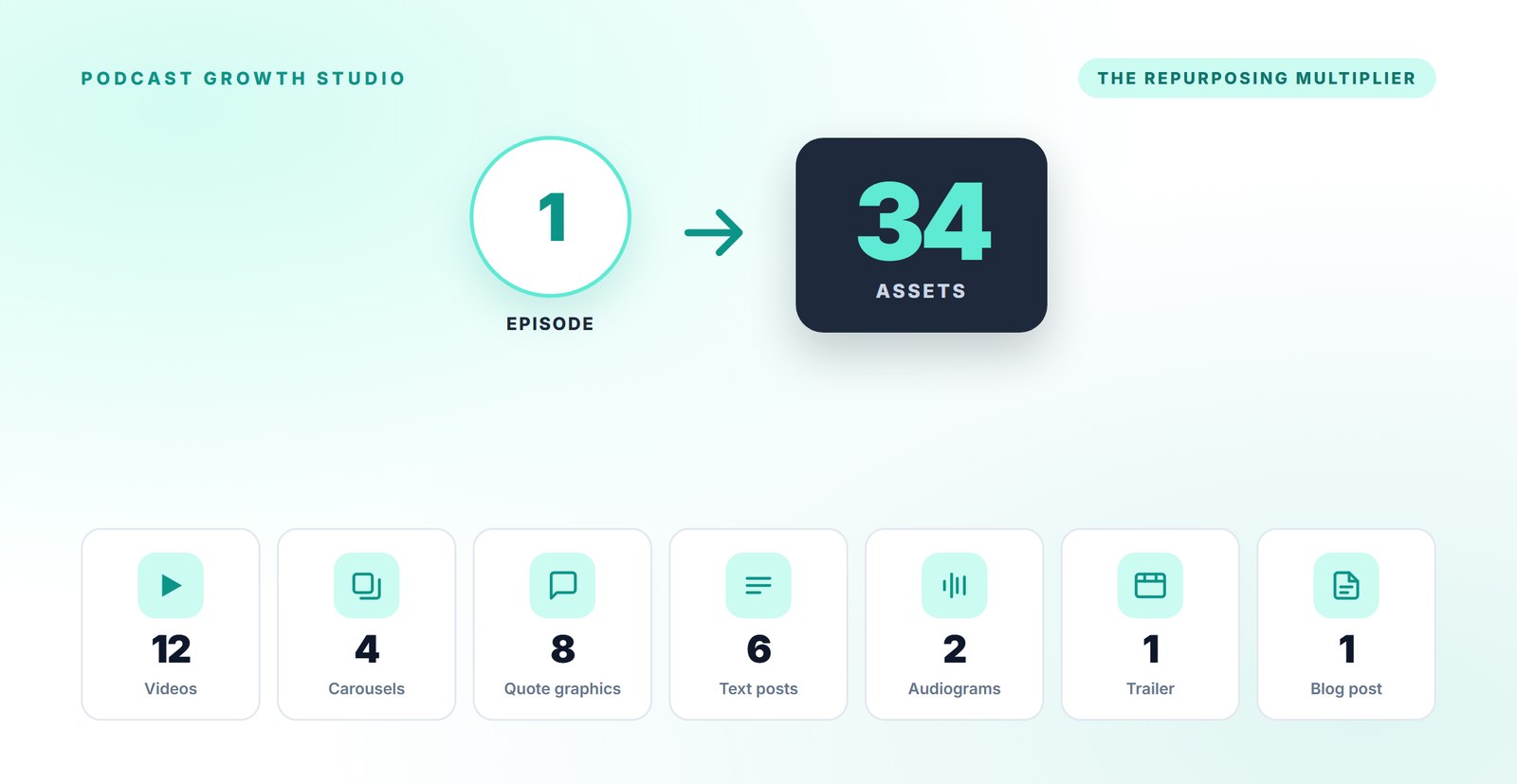
Pull all of these from one episode and you land at roughly 30 to 34 distinct pieces of content. At one or two posts per weekday, that is a full month of distribution from a single hour of recording. Want the numbers for your own show? Our free podcast repurposing calculator does the math in seconds.
The repurposing workflow, step by step
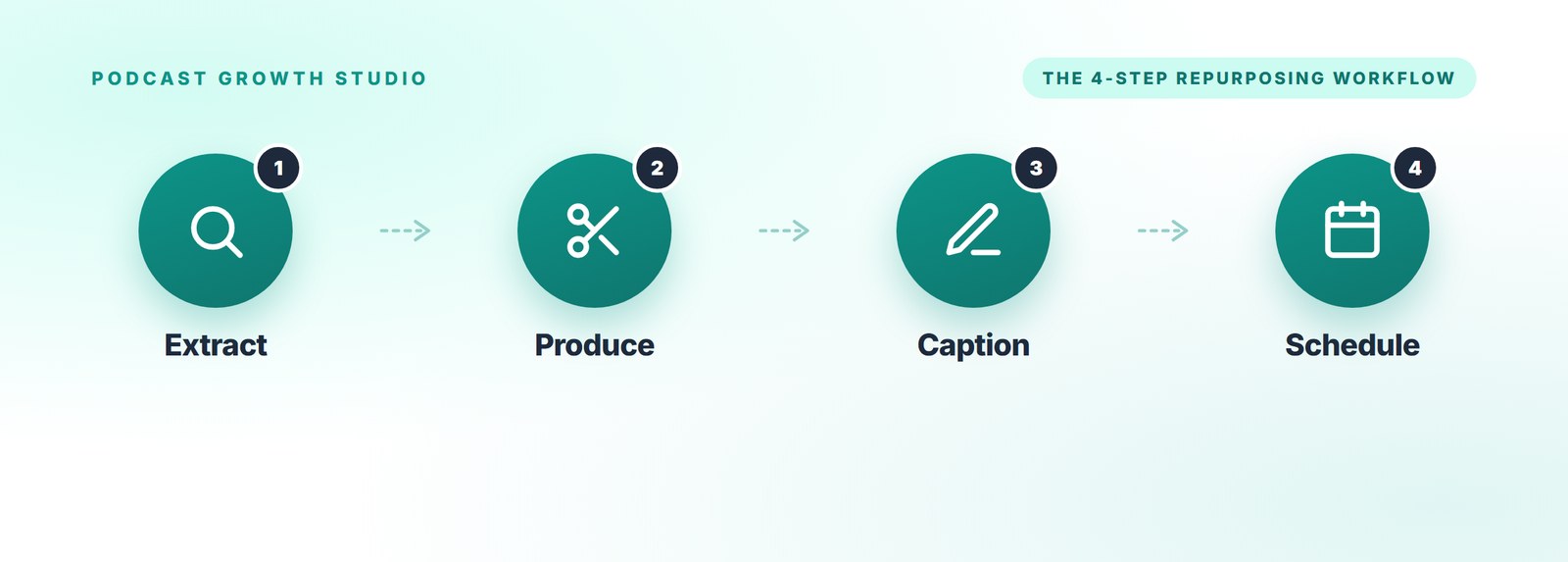
Knowing what to make is not the same as having a process to make it. Without a workflow, repurposing becomes the thing you intend to do this weekend and never quite do. Here is the four-step workflow that turns an episode into a month of content reliably, the same sequence whether you run it yourself or hand it off.
Step 1: Extract
Run the episode through a transcription tool, then read the transcript with a highlighter, not a clipper's eye. You are not hunting for viral moments. You are looking for ideas that can survive on their own. A useful filter: would this paragraph make sense to a stranger who has never heard of your guest? If yes, it is a candidate. If it needs the previous six minutes of conversation to land, it is footnote material. Aim to finish this step with a one-page sheet of 10 to 12 numbered ideas. That sheet drives everything downstream.
Step 2: Produce
Turn the idea sheet into assets. Order matters here, for a practical reason: build the most expensive, highest-review formats first, while your attention is sharpest. Cut the vertical video clips first. Then the carousels. Then batch the quote graphics, which are fast once a visual template exists. Build the audiograms and the trailer from clips you have already pulled. Hold one quality bar throughout: any asset that needs context from the full episode to make sense gets cut, not shipped.
Step 3: Caption
Every asset needs platform-native copy. Use a simple structure: a hook line that earns the first three seconds of attention, the value in the middle, and a clear next step at the end. Write a distinct caption per platform. The LinkedIn version is not the Instagram version. This is slower than pasting one blurb across all of them, and it is the difference between content that performs and content that just exists.
Step 4: Schedule
Do not dump the assets onto a scheduler in a single afternoon. Sequence them across a 30-day calendar with a deliberate arc: lead the first week with your single strongest asset to win reach, use the middle weeks to go deeper for the people who followed, and close with assets that invite a specific next step. Space the formats so you are not posting three carousels in a row. The same set of assets, sequenced well, will outperform the same set dumped at random by a wide margin.
Each step has a clean input and output. Extract turns an episode into an idea sheet. Produce turns the idea sheet into assets. Caption makes those assets postable. Schedule turns postable assets into a campaign. Skip a step and the chain breaks. If you want the deeper version of this, with the posting calendar and conversion tracking spelled out, our Content Engine Method guide walks through the full four-stage system.
Platform-by-platform repurposing
The same episode gets repurposed differently for each platform. A clip that works on LinkedIn is captioned differently, and sometimes cut differently, than the same clip on YouTube. Here is how the formats map to the platforms that matter for a B2B audience.
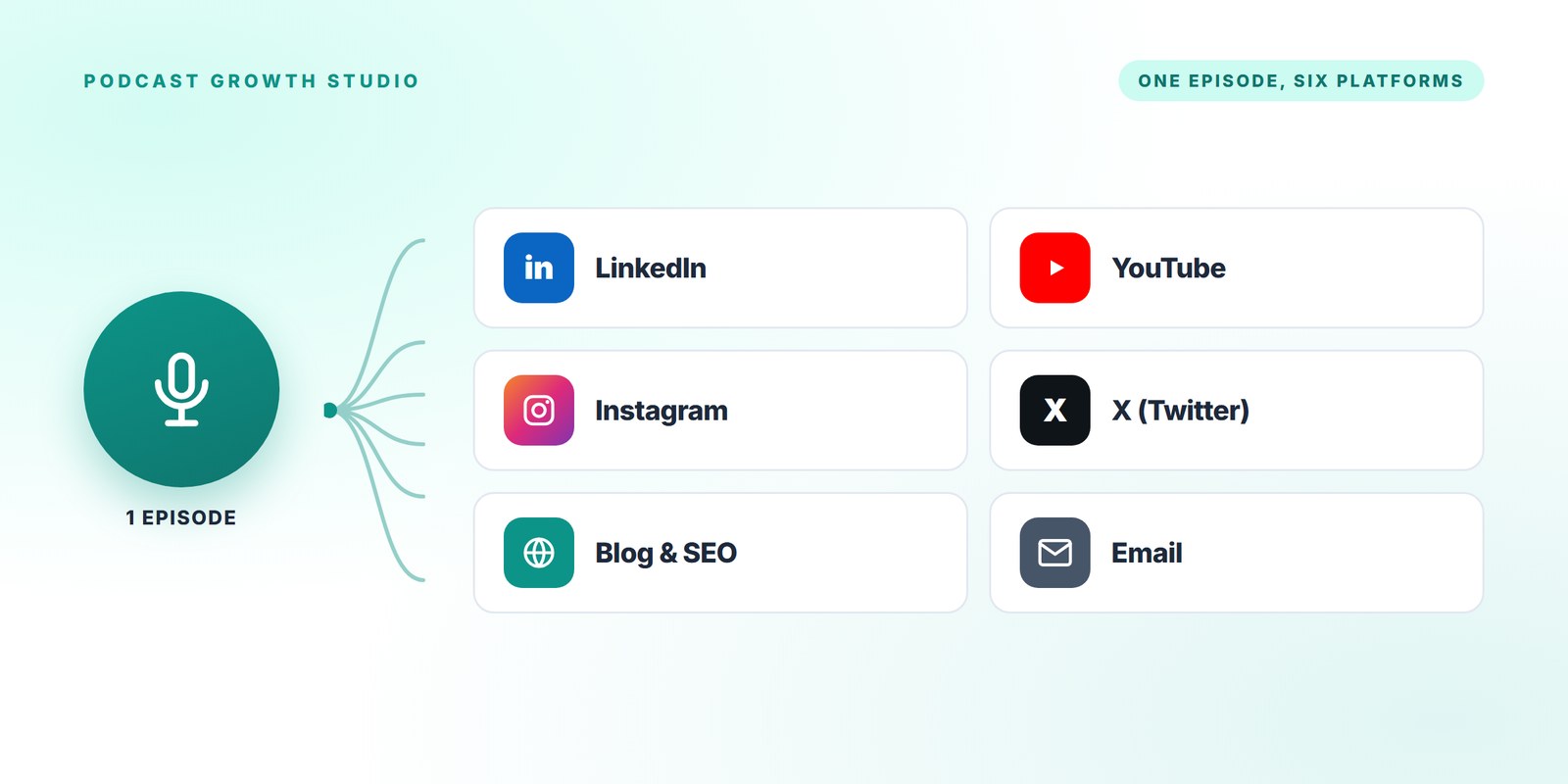
For most coaches, consultants, and B2B founders, LinkedIn is the highest-value destination, and it should get the most attention. It rewards text posts, carousels uploaded as documents, and native video. The one hard rule: do not put outbound links in the body of a post. LinkedIn suppresses reach on posts that send people off-platform. If you must link to the full episode, put the link in the first comment and write a real standalone post above it. For the full LinkedIn-specific process, see how to repurpose one podcast episode into 30 days of LinkedIn content.
YouTube
YouTube is two channels in one. Shorts is a discovery surface for your vertical clips. The main feed is where the full episode lives as long-form video, and where it can earn search traffic for years if the title and description are written for how people actually search. Audiograms also have a home here for audio-only shows.
Instagram favors Reels (your vertical clips again, sometimes recut), carousels, and quote graphics in both the main feed and Stories. For B2B it is usually a secondary platform, but the assets are already made, so the marginal cost of posting them there is close to zero.
X (Twitter)
X rewards text. The strongest move is to take the written posts and the best quotable lines and adapt them as standalone posts or short threads. Clips work, but text and threads carry more weight per unit of effort on this platform.
Your blog and SEO
This is the slow-compounding channel, and the one most podcasters ignore entirely. The long-form written post, published on your own site, can rank in search and bring in readers who would never scroll a feed looking for you. Episode show notes with a real summary and timestamps help too. Of every repurposing channel, this is the one still working for you a year later.
Email is the only channel on this list that you actually own. A newsletter built from each episode, even a short one, reaches people directly without an algorithm deciding whether they see it. Quote pull-outs and the long-form post both adapt cleanly into email.
The repurposing mistakes that waste the work
Most failed repurposing does not fail because the assets were bad. It fails because of a handful of specific, avoidable mistakes. We have audited enough B2B podcasts to see the same ones repeatedly.
Posting the episode link as the post
Sharing "new episode is live" with a link is promotion, not repurposing, and on most platforms it is the lowest-reach thing you can do. The link is a call to action, not content. Lead with an idea instead.
Clips that need a setup
If a clip opens with "so to your earlier point" or assumes the viewer knows who the guest is, it has already lost. Every clip has to be self-contained. The strongest 90 seconds of an episode is rarely the funniest exchange, which is usually inside baseball. It is the moment someone said something a stranger could use.
One caption, pasted everywhere
The same caption on LinkedIn, Instagram, and X will underperform on at least two of them. Each platform has a different reader in a different mindset. Writing three captions is slower. It is also the work.
Dumping the whole kit at once
Producing 30 assets and posting them across one frantic week, then going quiet, wastes most of the value. Consistency over a month beats a volume spike. The calendar is part of the deliverable, not an afterthought.
Repurposing in your guest's voice
Your audience followed you, not your guest. When you repurpose an insight from an interview, rebuild it as your own analysis, with credit. "My guest made a point this week I have not stopped thinking about" works. A transcript dump in the guest's words does not.
Quitting at week two
This is the expensive one. Repurposing compounds, and the compounding does not start on day three. Most hosts who try it quit right before the third and fourth weeks, which is exactly when the saved posts, the profile visits, and the first inbound messages tend to show up. If you stop at week two you will conclude that repurposing does not work, when the truth is it never got to run.
Tools for podcast repurposing
Tools do not make the system work. The workflow makes the system work. But you cannot run the workflow on nothing, so here is a lean, proven stack. You can stand all of this up in a week.
Transcription and editing
Descript is the default for many teams because it lets you edit audio and video by editing the transcript, which collapses the time between recording and the Extract step. For transcription with AI-assisted first-pass clip-finding, Castmagic is solid, though it will not replace human judgment on which ideas actually stand alone.
Design
Canva covers carousels and quote graphics for most people. Build a brand kit once, with your fonts, colors, and logo, and every asset inherits from it. The graphics in this very guide were built from plain HTML and screenshotted, which is another low-cost route if you have someone technical on the team.
Scheduling
Buffer is a reliable cross-platform scheduler. Post Bridge is a strong newer option that publishes to every major platform from one dashboard at a lower price point. For LinkedIn-heavy B2B accounts, Taplio adds engagement features the others do not.
Planning
Notion is a fine home for the idea sheet, the asset list, and the 30-day calendar, all in one place per episode. Any tool your team already uses will work. The discipline matters more than the software.
When to do it yourself, and when to hand it off
Not every host should outsource this, and not every host should do it alone. Here is an honest way to decide.
The real cost of repurposing one episode in-house, done to a standard worth publishing, is roughly 12 to 18 hours: an hour or two to extract, the bulk of it in production, and the rest in captions and scheduling. That number is the whole decision.
Do it yourself if
- You genuinely do not mind the production work. The system needs consistency for at least 90 days before it pays off, and if you resent the work you will quit at day 40.
- Your time is worth under roughly $150 an hour, or you have a real 10 to 15 hours a week of slack.
- Your show is young and your voice and brand are still forming. Doing the work yourself teaches you what your show actually is.
Hand it off if
- Your billable rate is north of $300 an hour. The math against doing it yourself stops working almost immediately.
- You have tried distribution before, fallen off, and the recordings are stacking up unused.
- The podcast is a marketing channel you are accountable for, not a side project. Accountability and intermittent effort do not coexist.
- You want the system running in days, not months.
There is also a middle path: do the Extract step yourself, since you know your content best, and hand off production, captions, and scheduling. It keeps editorial control where it matters and removes the time sink where it does not.
Frequently asked questions
What is podcast content repurposing?
Podcast content repurposing is the process of turning one podcast episode into multiple smaller, standalone pieces of content, such as short video clips, carousels, quote graphics, written posts, and articles, each formatted for a specific platform. The goal is for every piece to deliver value on its own, without requiring the audience to go and listen to the full episode.
How many pieces of content can you get from one podcast episode?
A 45 to 60 minute B2B episode realistically yields 30 to 34 distribution-ready assets: around 12 short video clips, 4 carousels, 8 quote graphics, 6 text posts, 2 audiograms, a trailer, and one long-form written piece. Posted one to two times per weekday, that covers a full 30-day calendar.
How long does it take to repurpose a podcast episode?
Done to a publishable standard in-house, one episode takes roughly 12 to 18 hours of work across extraction, production, captions, and scheduling. With a dedicated team and AI-assisted tooling, a full kit is typically production-ready within 7 days of receiving the recording.
What is the difference between repurposing and clipping?
Clipping is one tactic: cutting short video segments out of a recording. Repurposing is the whole practice, and clips are only one of the formats it produces. A repurposing strategy also includes carousels, written posts, quote graphics, audiograms, and long-form articles, because most of an episode's value travels better as text or design than as video.
Can you repurpose an audio-only podcast?
Yes. Audio-only episodes still produce audiograms (waveform videos with captions), text posts, carousels, quote graphics, and long-form articles. You lose the talking-head vertical clip that video-first shows get, but the remaining formats do most of the distribution work, especially on LinkedIn.
Should you repurpose old podcast episodes?
Yes. Most B2B podcast content is evergreen, and a back catalog is a library of raw material that has already been paid for. Old episodes can be re-mined for clips and posts at any time, and your audience has almost certainly not seen most of it. Starting with your three strongest past episodes is a low-risk way to test the workflow.
The episode is the raw material, not the finished product
If there is one idea to take from this guide, it is that the recording is not the deliverable. It is the raw material. The clips, posts, carousels, and articles are what actually reach people, and the calendar is what gives them a reason to compound. A podcast without a repurposing layer is a good conversation that a few hundred people borrow and then forget.
You do not need to record more. You do not need better gear or a bigger guest. You need a system that takes the episodes you are already making and turns each one into a month of work. Build that system once and your next 50 episodes will outperform your last 50 without anything about the recording itself changing.
If you want to see what a full repurposing kit looks like before you build or buy one, we can build it for you. We turn one episode into a month of finished, ready-to-post content. You can see how it works, and the founding price, on the Content Engine page.
Record the next episode. Then put it to work.