
Opus Clip made automated podcast clipping easy to understand: upload a long recording, let AI find candidate moments, and turn them into vertical videos. The harder question is whether it is the right workflow for your show.
The best Opus Clip alternative for podcasters depends on what you already use, how much editorial control you need, and whether you want a clip generator or a complete recording-to-publishing platform. No tool removes the need to check context, captions, framing, and the promise made in the opening line.
Editorial disclosure: Podcast Growth Studio has received outreach and offers of complimentary access from podcast-tool developers. Access does not buy inclusion, ranking, or a positive verdict. Sponsored placements, when present, are labeled and kept separate from editorial recommendations.
The quick answer
These are the 10 software alternatives worth putting on a podcast-clipping shortlist:
| Tool | Best starting point | Workflow type |
|---|---|---|
| Riverside | You already record in Riverside | Recording plus clipping |
| Vizard | You want a dedicated repurposing workspace | Focused AI clipping |
| Descript | You edit the full episode from a transcript | Full editor plus clipping |
| quso.ai | You need clipping and social scheduling | Clipping plus publishing |
| Klap | You want a direct long-video-to-shorts tool | Focused AI clipping |
| Submagic | Caption styling and short-form polish matter | Short-form editor plus clipping |
| Captions | You want automated framing and visual cleanup | AI editing plus clipping |
| VEED | You want a general browser-based editor | Full editor plus clipping |
| Kapwing | You want prompt-guided clip extraction | Creative editor plus clipping |
| Wisecut | You want automated cleanup without a timeline | Automatic editor plus clipping |
This is a researched evaluation list, not a claim that PGS has tested every tool hands-on. Product links below point to current official pages. Features, limits, and pricing can change.
Opus Clip can still be the right choice. An alternative is useful only when it removes a real constraint, such as duplicate subscriptions, limited editing control, missing publishing destinations, or weak clip selection for your type of conversation.
What to compare before switching
Feature lists make most clipping tools look interchangeable. A real test should focus on the decisions that affect the finished content.
Clip selection
Does the tool find complete ideas, or only energetic sentences? A clip can start strongly and still fail if the answer depends on a question that was removed. Review whether each candidate makes sense to someone who has never heard the full episode.
Editing control
Check whether you can change the start and end points, repair the transcript, choose the active speaker, adjust framing, and replace the suggested hook. Fast generation matters less if every correction requires exporting to another editor.
Captions and brand control
Test names, technical terms, punctuation, and speaker changes. Then check whether caption style, safe zones, fonts, colors, logos, and layouts can be saved instead of rebuilt for every episode.
Publishing workflow
Some teams need an exported file. Others need approval, scheduling, and direct publishing. Confirm which destinations are live today instead of buying based on a roadmap.
Pricing model
Compare the cost against your actual monthly footage. Credit-based pricing can work for a small show. Flat-rate pricing can be easier for a high-volume team. An all-in-one platform can also reduce cost when it replaces a recorder, editor, and clip generator rather than adding another overlapping subscription.
10 Opus Clip alternatives for podcasters
1 Riverside Magic Clips
Riverside is the strongest first alternative for teams already recording there because Magic Clips sits inside the same project workflow. According to Riverside's Magic Clips documentation, the system identifies highlights from recorded or uploaded audio and video, adds captions, and lets users customize the result in the editor.
Riverside says Pro and Business users can generate additional clips and guide generation with duration, speaker, and keyword preferences. Its public Magic Clips page also documents aspect-ratio presets, branding controls, transcript-based editing, caption customization, and exports up to 4K.
Best fit: podcasters who already use Riverside and want to avoid moving recordings between separate tools.
Test carefully: whether the automatically selected moments preserve the question, qualification, and ending needed for a standalone clip. Recording integration saves time, but it does not guarantee editorial relevance.
2 Vizard
Vizard is positioned as a dedicated long-video repurposing platform. It is a sensible comparison candidate when you want AI-generated clips plus room to reshape them before publishing.
The practical test is not whether Vizard produces many clips. It is whether you can turn its first-pass candidates into accurate, branded assets without rebuilding them elsewhere. Check transcript correction, reframing, caption control, brand presets, team review, export quality, and direct publishing for the channels you actually use.
Review the current plan limits on Vizard's official pricing page before comparing cost. Tool limits and pricing change, so calculate against your monthly source-video minutes rather than an old roundup table.
Best fit: creators and teams that want a dedicated repurposing workspace instead of an all-in-one recording platform.
Test carefully: the amount of manual cleanup needed after automatic selection and how the plan handles your real monthly volume.
3 Descript
Descript combines transcript-based video editing with AI clip creation. Its official Underlord page describes an AI co-editor that can create promotional clips, while Descript's editor supports transcript changes, layouts, captions, filler-word removal, and audio cleanup.
Best fit: podcasters who want to edit the full episode and create social clips in the same text-based workspace.
Test carefully: AI-credit usage, media-hour limits, and how much clip selection still needs a manual editorial pass.
4 quso.ai
quso.ai, previously known as vidyo.ai, combines AI clip detection, auto-reframing, animated captions, brand controls, and social scheduling. The official quso.ai product page lists publishing support for TikTok, Instagram, YouTube, LinkedIn, Facebook, and X.
Best fit: creators who want clipping and a multi-platform publishing calendar in one subscription.
Test carefully: whether its automatically scored moments match your buyer and whether every required social connection works reliably with your accounts.
5 Klap
Klap
Klap focuses on turning long videos into short clips with dynamic captions and automated reframing. Its official tools page also lists transcript editing, speaker tracking, virality scoring, brand kits, bulk processing, and an API.
Best fit: solo creators and teams that want a focused long-video-to-shorts tool without a full podcast recording suite.
Test carefully: source-video limits, export allowances, caption accuracy, and whether bulk or API features are included in the plan you need.
6 Submagic
Submagic is primarily a short-form video editor, with Magic Clips offered for turning podcasts, interviews, and webinars into multiple shorts. Its official pricing page lists captions, text-based trimming, silence removal, audio cleanup, brand assets, publishing, and Magic Clips availability by plan or add-on.
Best fit: teams that care heavily about caption styling and polishing clips after the first AI cut.
Test carefully: whether long-form clipping is included or charged separately, plus maximum source duration and monthly clip allowances.
7 Captions
Captions offers a Clips workflow that analyzes long videos, surfaces shareable moments, reframes speakers, and prepares horizontal or vertical outputs. The official Clips page documents prompt-guided regeneration, virality scoring, multi-speaker handling, and support for uploads up to 3 hours or 10 GB.
Best fit: creators who want automated clip selection followed by AI-assisted visual cleanup and reframing.
Test carefully: device and plan availability, processing time, supported languages, and how much control remains after generation.
8 VEED
VEED
VEED's Clips feature turns spoken long-form videos into short outputs inside its browser editor. According to VEED's official help guide, it can find highlights, add subtitles, center the speaker, remove filler words, rate candidates, and let users adjust clip length and styling.
Best fit: teams that want AI clipping inside a general-purpose online video editor.
Test carefully: upload requirements, language support, export limits, and whether your plan includes the volume you need.
9 Kapwing
Kapwing's AI Clip Maker uses prompts to extract particular topics, quotes, or moments from long videos. Its official Clip Maker page describes multiple aspect ratios, adjustable clip lengths, subtitles, speaker focus, and continued editing in Kapwing's browser workspace.
Best fit: marketers who want to direct clip selection with a prompt and then refine the result in a broader creative editor.
Test carefully: source and export limits, watermark rules, collaboration needs, and whether prompt-guided extraction beats automatic selection for your show.
10 Wisecut
Wisecut combines AI highlight detection with automatic captions, translations, silence removal, reframing, background music, and transcript-style storyboard editing. Its official product page positions the tool as an automatic editor for turning long videos into short clips.
Best fit: creators who want automated cleanup and clip generation without working in a traditional timeline.
Test carefully: export resolution, monthly processing time, audio choices, and whether automated silence removal preserves natural conversation pacing.
The alternative most comparison articles ignore
The alternative to Opus Clip is not always another clipping app. For consultants, financial professionals, and B2B founders, the expensive mistake is often choosing the wrong moment rather than spending too long on the cut.
A human-reviewed workflow can still use AI for transcription, silence removal, reframing, and caption drafts. The human layer decides which idea supports the buyer, where context begins, what qualification must remain, and whether the final clip matches the speaker's actual position.
Use the 3-Test Rule for choosing podcast clips: the moment should stand alone, earn attention quickly, and support a buyer-facing idea. AI can accelerate the mechanical work after those decisions are made.
Best fit: shows where positioning, accuracy, client trust, or compliance matters more than producing the highest possible number of clips.
How to run a fair Opus Clip alternatives test
Do not compare tools using different episodes. Choose one public recording between 30 and 60 minutes and run the same source file through each candidate.
- Define the target first. Write down the audience, the business idea the episode should reinforce, and the platforms you need.
- Generate without manual prompting. Record how many usable candidates each tool finds on its first pass.
- Score context. Reject clips that require missing setup or cut off before the answer is complete.
- Measure correction time. Track minutes spent fixing captions, framing, hooks, start points, and end points.
- Export the same format. Compare resolution, caption placement, audio, branding, and file size.
- Test publishing separately. Confirm the destinations and approval steps you actually need.
- Calculate cost per approved clip. Subscription price alone hides the time spent repairing weak output.
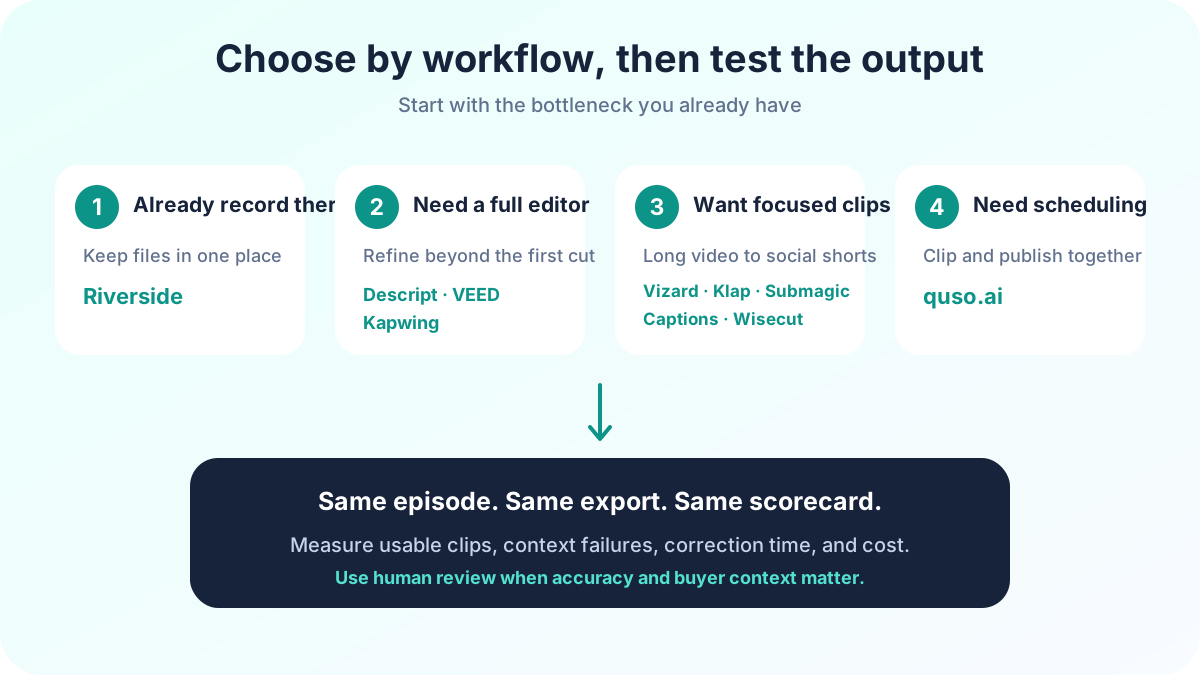
A useful scorecard includes first-pass candidates, approved clips, correction minutes, caption errors, missing-context failures, export quality, publishing success, and monthly cost. That produces a decision based on your workflow rather than a vendor's virality score.
Choose the workflow, not the longest feature list
Riverside is the easiest first test when your recordings already live there. Descript, VEED, and Kapwing make more sense when you also need a broader editor. Vizard, Klap, quso.ai, Submagic, Captions, and Wisecut offer different versions of the focused AI-clipping workflow. A human-reviewed process remains the strongest choice when each clip has to carry a precise business idea.
If you want software to surface candidates, test the same episode across 2 tools before switching. If you want the full month handled, the PGS Content Engine turns one episode into 6 reviewed clips, 4 carousels, 5 quote graphics, captions, show notes, and a 30-day LinkedIn plan. The founding offer is $299 per month.