
Gear is the most over-thought part of starting a podcast and the least important. People spend weeks comparing microphones and never hit record, when the honest truth is that a 70-dollar mic and a quiet room are enough to launch a show that sounds genuinely professional.
This guide is built to save you money, not spend it. I will tell you the one thing worth getting right, the few upgrades that actually matter, what to skip entirely, and the rule that beats every gear decision: a well-placed budget mic in a treated room sounds better than an expensive mic in a bad one.
I spent 7 years in live radio and hosted a 200-episode show, so I have used gear at every price point. What follows is what I would tell a friend who is about to overspend out of nerves. Buy the short list, skip the rest, and put the time and money you save into the thing that actually grows a show.
What this guide covers
- The truth about gear (you need less than you think)
- The microphone: the one thing worth getting right
- Headphones
- Your room (free, and it matters more than the mic)
- Recording and interview software
- If you record video: camera and lighting
- Editing software
- Hosting: where the show actually lives
- Three starter kits by budget
- What to skip (the overspending traps)
- Frequently asked questions
- Resources for further reading
The truth about gear (you need less than you think)
Here is the rule that should guide every decision below: your recording space matters more than how much you spend on the microphone. A well-positioned budget mic in a treated room beats expensive gear in an echoey one, every time. Audio pros agree on this almost universally, and it is the single most money-saving fact in podcasting.
The returns on spending diminish fast. Going from your laptop or phone mic to a 70-dollar dynamic mic is a massive jump in quality. Going from that to a 300-dollar mic is a real but smaller step. Going beyond that is mostly for people who record for a living. Most shows never need to leave the first two tiers.
So the goal of this guide is not the best gear. It is the least gear that sounds great, so you can launch now and spend your energy where it counts.
The microphone: the one thing worth getting right
If you spend real attention on one purchase, make it the mic. Two quick decisions settle it.
USB or XLR
For nearly every beginner and solo host, choose USB. It plugs straight into your computer, needs no audio interface, and many models have a headphone jack for zero-latency monitoring. XLR only earns its place when you record two or more people in one room, want a specific preamp, or plan to scale past two mics. The good news: several mics do both, so you can start USB and move to XLR later without rebuying.
Dynamic or condenser
For home recording, choose a dynamic mic. Dynamics reject room noise and background sound, which is exactly what you want in an untreated space. Condenser mics like the popular Blue Yeti are more sensitive and pick up everything, the keyboard, the room, the street, which is why they often disappoint first-time podcasters recording at home.
The picks that actually deliver
- Samson Q2U (around 70 dollars), the first-timer's answer. A USB and XLR dynamic with a headphone jack and a stand, it delivers roughly 80 percent of the quality of mics three times the price. If you want one recommendation, this is it.
- Shure MV7+ (around 299 dollars), the step up. A broadcast-style dynamic with USB-C and XLR that handles untreated rooms better than almost any plug-and-play option, with processing built in. Buy this when you want studio sound without a studio.
- Rode PodMic or similar (XLR), for multi-person rigs. Once you are recording several people in one room through an interface, a set of matched XLR dynamics is the move.
Headphones
You need headphones so you can hear problems while you record, not after. The only real requirement is closed-back, which isolates sound and stops your audio leaking back into the mic. You do not need expensive ones. A budget pair like the AKG K72 is plenty to start, and almost any closed-back headphones you already own will do. This is not a place to spend.
Your room (free, and it matters more than the mic)
This is the upgrade nobody sells you because it is free. Soft surfaces absorb the echo that makes home recordings sound amateur. A small room with a rug, curtains, a sofa, and books beats a big, hard-surfaced office every time. Recording in a closet full of clothes is a genuine pro trick, not a joke.
Get close to the mic (a hand-width away), point it at your mouth, and record away from bare walls and windows. These free adjustments do more for your sound than any upgrade you can buy. If you do one thing in this whole guide, treat your space before you spend another dollar.
Recording and interview software
What you need depends on who is in the room.
Recording solo or in person: free is fine to start. Audacity is free and capable, and tools like GarageBand come built in. You do not need paid software to make a great-sounding episode.
Recording remote guests: this is the one place worth a paid tool. Use a platform that records each person locally, so quality does not depend on the internet connection. Riverside and similar tools capture separate, high-quality tracks for each speaker and handle video too. Do not run remote interviews over a normal video-call recording if you can avoid it, the audio rarely holds up.
If you record video: camera and lighting
You do not need video to start, but it is worth adding once you are consistent, because YouTube now leads podcast discovery and video gives you clips, the format that drives the most reach. When you do add it, keep it simple:
- Camera: a clean webcam or even a recent phone is enough to begin. A dedicated camera is a later upgrade.
- Lighting: one good light source, or a window in front of you, beats an expensive camera in the dark. Lighting matters more than the camera.
- Background: a tidy, simple backdrop reads as professional. You do not need a set.
If recording video is the thing that would stop you from publishing at all, start audio-only and add a camera later. Published beats perfect.
Editing software
Start free and upgrade only if you feel a real limit. Audacity (free) and GarageBand (free on Mac) handle everything a new show needs. When you want to edit faster, transcript-based editors and AI tools have made editing dramatically quicker, you can cut by deleting text and auto-remove filler words. Our rundown of the best AI tools for podcasters covers what actually works for editing, transcription, and clips.
The trap here is buying a powerful editor and never learning it. The best editing software is the one you will actually use every week.
Hosting: where the show actually lives
This one is not gear, but you cannot publish without it. A podcast host stores your audio files and generates the RSS feed that carries your episodes to Apple, Spotify, and the rest. It usually costs a few dollars a month. Pick one early, since it is the backbone of distribution, and plan to publish to YouTube too given how much discovery happens there now. The full picture of where to publish is in how to promote a podcast in 2026.
Three starter kits by budget
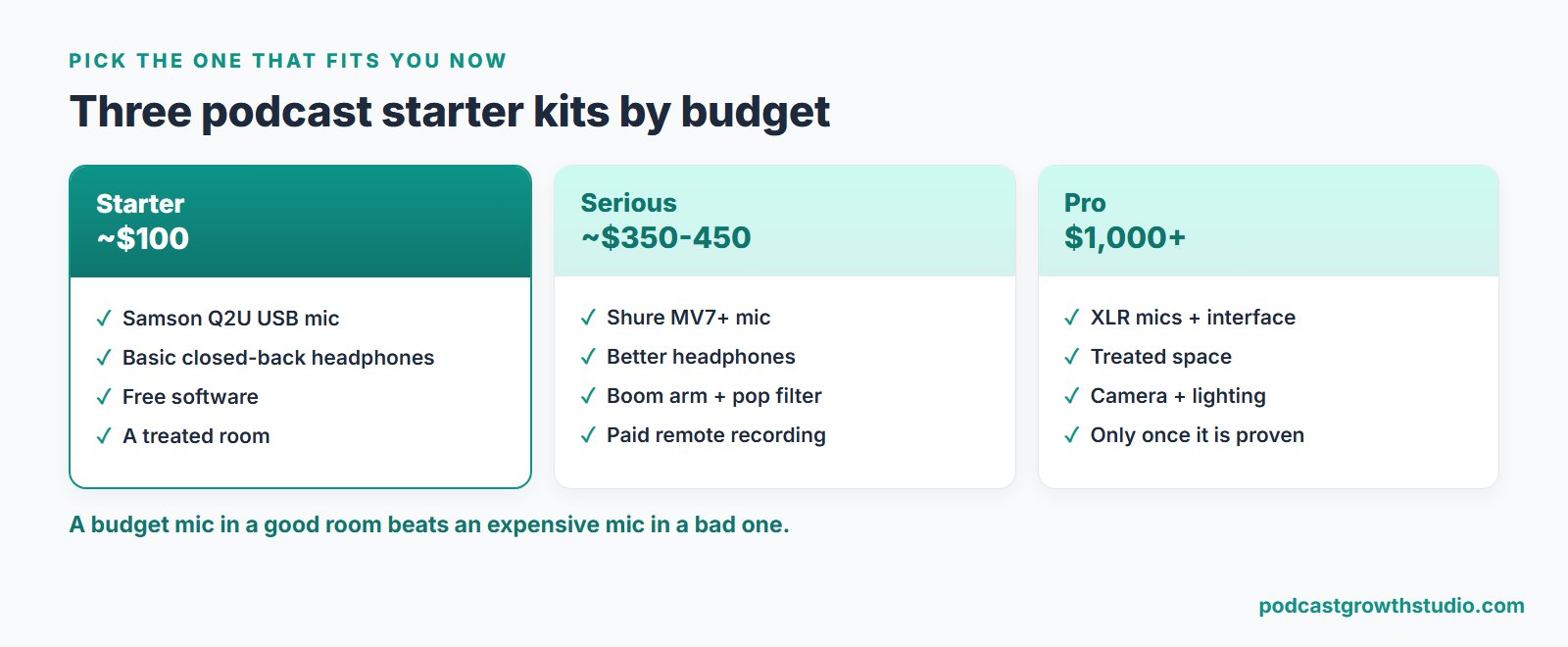
Here is the whole guide as three simple shopping lists. Pick the one that matches where you are, not where you hope to be.
The Starter kit (around 100 dollars)
A Samson Q2U USB dynamic mic (about 70), a basic pair of closed-back headphones (about 25), free recording software, and a treated room. This is not a compromise, it is a genuinely good setup that has launched thousands of successful shows. Start here and do not apologize for it.
The Serious kit (around 350 to 450 dollars)
A Shure MV7+ (about 299), better closed-back headphones (about 100), a boom arm and pop filter, and a paid remote-recording tool if you interview guests. This is the sweet spot for a host who knows they are committed and wants to sound polished without overspending.
The Pro kit (1,000 dollars and up)
Matched XLR dynamic mics, an audio interface or mixer for multiple people, a properly treated space, and a real camera and lighting setup for video. Only build this once the show has proven itself. Spending here before you have an audience is the classic mistake.
What to skip (the overspending traps)
Just as useful as what to buy is what to ignore until much later:
- An expensive condenser mic for a home office. It will pick up your room. A cheaper dynamic sounds better in that space.
- A mixer or audio interface before you actually have XLR mics and a multi-person setup. It solves a problem you do not have yet.
- A cinema camera before you have proven you will publish consistently. Lighting and a webcam get you 90 percent there.
- A second or third mic for a show that is currently just you.
- Premium editing software you will not take the time to learn.
Every dollar and hour you save here is better spent on the thing gear cannot do: getting the show in front of people.
Frequently asked questions
What equipment do I need to start a podcast?
Less than you think. To launch you need one decent microphone, a pair of closed-back headphones, free recording software, and a quiet room. A USB dynamic mic like the Samson Q2U (around 70 dollars), basic headphones, and the free editor on your computer is a genuinely good first setup. Everything beyond that is an upgrade, not a requirement. The recording space matters more than spending more on the mic.
What is the best microphone for podcasting?
For most people, a USB dynamic microphone. The Samson Q2U (about 70 dollars) is the long-standing first-timer pick and delivers roughly 80 percent of the quality of mics three times its price, with USB and XLR, a headphone jack, and a stand. If you want a step up that handles an untreated room well, the Shure MV7+ (around 299 dollars) is the strong choice with both USB-C and XLR. Dynamic mics beat condensers like the Blue Yeti for home recording because they reject room noise.
Do I need an audio interface or a mixer to start a podcast?
No. A USB microphone plugs straight into your computer and skips the interface entirely, which is why it is the right call for beginners and solo hosts. You only need an audio interface or mixer when you move to XLR microphones, usually because you are recording two or more people in the same room on one computer. Do not buy one until that is actually your setup.
Is a USB or XLR microphone better for podcasting?
USB is better for most beginners and solo hosts: it is plug-and-play, needs no interface, and many models include a headphone jack for zero-latency monitoring. XLR is better when you record multiple people in one room, want a specific preamp, or plan to scale past two mics. Many modern mics, like the Samson Q2U and Shure MV7+, do both, so you can start on USB and switch to XLR later without rebuying.
How much does podcast equipment cost?
You can start for around 100 dollars: a USB dynamic mic (about 70), basic closed-back headphones (about 25), and free software. A serious setup runs roughly 300 to 450 dollars with a mic like the Shure MV7+, better headphones, and a boom arm. A full pro or multi-person rig with XLR mics, an interface, and treated space can run 1,000 dollars or more, but you should only spend that once the show has proven itself.
Do I need a camera for a podcast?
Not to start, but video is worth adding once you are consistent, because YouTube now leads podcast discovery and video gives you short clips, the format that drives the most reach. You do not need a cinema camera. A clean webcam or your phone, plus one good light source and a tidy background, is enough to begin. Add it when recording video will not stop you from publishing at all.
Resources for further reading
Solid, current outside guides for the gear specifics and reviews:
- The Podcast Host, Samson Q2U review. A deep look at why the Q2U is still the top first-mic pick. thepodcasthost.com
- Riverside, Best Podcast Equipment for Beginners and Pros. Budget-by-budget gear breakdowns. riverside.com
- Alitu, Best Podcast Microphones (from 15 years of testing). A long-running, hype-free mic comparison. alitu.com
From the PGS blog: gear is one piece of the launch, the rest is in how to start a B2B podcast and the 50 questions to answer before you start. For editing and clip tools, see the best AI tools for podcasters. And for the thing that matters far more than gear, read how to grow a podcast.
Closing: buy the short list, then go make it count
Good gear will not grow your podcast. A 70-dollar mic, a quiet room, and consistency will take you further than a thousand-dollar rig you bought to feel ready. Get the short list, treat your space, hit record, and stop shopping.
Because the real bottleneck is never the microphone. It is everything that happens after you record: the clips, the posts, the distribution that actually puts the show in front of people. That is the part most hosts never get to, and the part we handle for you. You can see how one recording becomes a month of content on the Content Engine page.